


From Drone Photos to Work Orders: an 8-Step Guide for Utility Inspection Teams
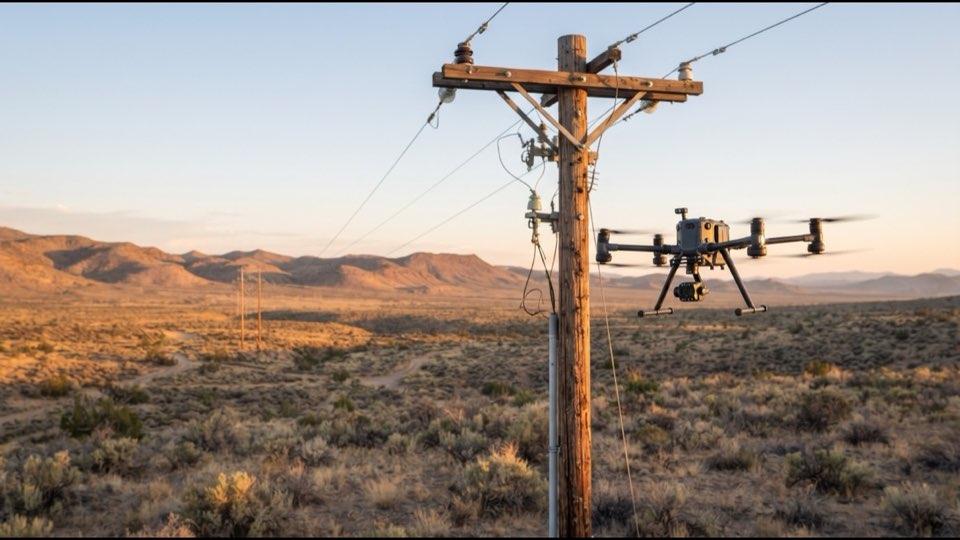
For most utilities, flying the drones is the easy part; the trouble starts with thousands of photos that have to become repairs. A working pipeline keeps every image tied to a pole from upload to closed work order, through file naming, pole tagging, machine-learning detection, human review, reporting and feeder analytics. The table shows what each stage loses without a system and what it needs.
| Stage | What gets lost without a system | What it needs |
|---|---|---|
| Upload | HD and thermal frames of the same pole drift apart | A file-naming standard and automatic pairing |
| Asset tagging | Which pole a photo shows | Network geometry plus image location data |
| Detection | Consistency between inspectors | ML models run by an orchestrated pipeline |
| Review | Context for each finding | A map workspace with HD and thermal side by side |
| Reporting | Hours of manual copy and paste | Generated PDF, JSON and Excel reports |
| Work orders | The link between photo and repair | Direct handoff to the work-order system |
| Analytics | Where crews should go next | Feeder dashboards built from closed defects |
| Security | Control over who sees grid data | Roles, session limits and expiring share links |
Pairing HD and Thermal Images Starts With File Names
1. Agree on one file-naming standard
Most inspection drones capture a high-definition photo and a thermal photo of the same asset. If the pilot team, the contractor and the software all follow one naming convention, the system can pair the two frames automatically instead of an inspector matching them by eye.
Write the standard down, include it in flight contracts and reject uploads that break it. A single exception per flight multiplies into hours of cleanup across a season.
2. Tag every image to a pole
An image is useful only when the system knows which asset it shows. Combine the network geometry from your GIS with the location data stored in each photo to assign it to the nearest pole automatically.
Leave room for manual fixes. Dense urban networks and poles carrying several devices will always produce a few edge cases that an inspector has to correct.
Detection Models and the Platform Are Separate Jobs
3. Keep the models apart from the system that runs them
Treat the detection models and the platform around them as two separate jobs. For a power distribution utility in the United Arab Emirates, a team that built a drone inspection platform wired the client's own ML models into an Azure pipeline that uploads 482 images with full pre-processing in 1 minute 27 seconds and sustains about 2.1 images per minute of detection. Todor3D, based in Culver City, built the map, reporting and work-order layers over 12 months, while the models came from the utility's ML team.
That split lets a utility swap or retrain models without rebuilding the inspection workflow. The platform handles queues, retries and per-image error reports, so inspectors can start on early results while later ones are still processing.
Ask any vendor which side of this line it covers. Some sell models, some sell platforms, and a few do both; your contract should say who owns accuracy and who owns uptime.
Inspectors Work Best on a Map
4. Make the map the main workspace
Inspectors think in lines, feeders and regions, not in folders of JPEGs. A map with GIS layers, pole and device filters, clustering and search by asset code or coordinates matches how they already work.
Measurement tools and links between poles, devices and network lines save trips back to the asset register. Open-source libraries such as deck.gl can render large networks in the browser without special software on inspectors' laptops.
5. Put a person in front of every defect
Models flag candidates; people confirm them. Show the HD and thermal images side by side, aligned, with the defect marker and temperature reading on screen.
Keep a history for every defect, including who closed it, who reopened it and why. That archive becomes your audit trail and the training data for the next version of the models.
A Defect Is Done Only When It Reaches a Work Order
6. Connect reports to the maintenance system
Confirmed findings need to leave the inspection tool in formats other teams use. Generate PDF reports with pole-level sections and paired thumbnails, plus JSON and Excel exports for engineers and regulators.
The real finish line is the work order. In the UAE project the platform includes a work-order module with explicit status stages and a pipeline built for IBM Maximo, so a defect photographed in the field reaches a repair crew without retyping.
Feeder Analytics Show Where Crews Should Go Next
7. Build analytics from closed defects
Once defects flow into work orders, the data starts answering planning questions. Track mean time to repair by region, repair frequency per feeder and the most common defect types.
A feeder dashboard turns those numbers into a short list of where crews should go next. It also shows whether a new inspection cycle actually reduced repeat failures.
The dashboard Todor3D built for the UAE utility groups feeders by region and shows six analytics cards, including MTTR comparisons across regions and the ten defect types that take longest to fix. Start with a handful of measures like these and add more only when planners ask for them.
8. Lock down access from the start
Grid imagery and defect locations are sensitive infrastructure data. Use role-based access, fixed session lengths and audit logs for every export.
When contractors or regulators need a look, share view-only links that expire. In the UAE platform, external share links stay valid for five days and user sessions last 24 hours.
FAQ
How long does it take to put a drone inspection platform in place?
A full platform with detection orchestration, map review, reporting and work-order handoff is a multi-month project. The UAE build took 12 months; a narrower tool covering upload, pairing and review can go live sooner.
Should we build our own detection models or buy them?
Utilities with a data science team and labeled images can train their own; others license models from specialist vendors. Either way, keep the models replaceable behind a stable platform interface.
Can the platform feed our EAM system?
Yes, if integration is planned early. Agree on the work-order format and status codes with the team that runs your enterprise asset management system before development starts.
Categorie
Leggi tutto
The ceramic bone joint market is evolving toward 3D printing, personalised implants, and global expansion. These trends will shape growth and determine how ceramic implants develop over the coming decade. 3D printing is a major theme. Patient-specific ceramic implants and porous structures that promote bone ingrowth are improving outcomes and expanding treatment options. According to ceramic...

Water supply systems need dependable control solutions to maintain consistent pressure and respond efficiently to changing water demands. During the planning of residential, agricultural, and commercial pumping projects, Installation Automatic Pump Control becomes an important consideration for improving daily operation. A properly selected Installation Automatic Pump Control device can help...
The agricultural industry is undergoing a significant transformation as farmers seek smarter and more sustainable ways to manage crop nutrition. Traditional fertilization practices are increasingly being replaced by advanced nutrient management strategies that combine scientific precision with biological innovation. Compound biofertilizers and customized fertilizers are at the center of this...
The Europe air charter services market is witnessing robust growth due to rising demand for flexible and time-efficient travel solutions. Businesses, high-net-worth individuals, and even government agencies are increasingly turning toward charter services to bypass the limitations of commercial airlines. This shift is largely driven by convenience, privacy, and customized travel schedules. One...
When working with dense materials such as concrete or masonry, selecting the appropriate drilling accessory is essential for maintaining efficiency and consistency. The Fangda Hammer Drill Bit plays a critical role in this process, combining rotational force with impact motion to penetrate tough surfaces. With solutions offered by fangda-tools, users can approach demanding tasks with tools...